Thursday, November 19, 2009

Tuesday, November 17, 2009
Saturday, November 14, 2009
Friday, November 13, 2009
Thursday, November 12, 2009
Wednesday, November 11, 2009
Tuesday, November 10, 2009
Monday, November 09, 2009
Saturday, November 07, 2009
Friday, November 06, 2009
Thursday, November 05, 2009
Wednesday, November 04, 2009
Monday, November 02, 2009
Sunday, November 01, 2009
Friday, October 30, 2009
Thursday, October 29, 2009
Wednesday, October 28, 2009
Tuesday, October 27, 2009
Monday, October 26, 2009
Sunday, October 25, 2009
Saturday, October 24, 2009
Friday, October 23, 2009
Thursday, October 22, 2009
Wednesday, October 21, 2009
一日早朝,王�
Tuesday, October 20, 2009
Monday, October 19, 2009
Sunday, October 18, 2009
Friday, October 16, 2009
Thursday, October 15, 2009
Wednesday, October 14, 2009
Tuesday, October 13, 2009
Sunday, October 11, 2009
Saturday, October 10, 2009
交警同志,向�
Friday, October 09, 2009
Wednesday, October 07, 2009
Tuesday, October 06, 2009
Friday, October 02, 2009
 10月1日 城楼的忧伤角落里
天安门大柱子�
Thursday, October 01, 2009
Tuesday, August 04, 2009
8个优秀的Grease Monkey脚本推荐
GreaseMonkey是Firefox 3扩展推荐里介绍过的一个十分优秀的扩展,它实现了“扩展再扩展”的功能。安装一些GreaseMonkey脚本后,你的浏览器的体验将会更上一层楼。虽然除了Firefox,其它一些浏览器也支持GreaseMonkey脚本,但我还是建议你使用Firefox,Fx扩展+GM脚本,这是个很好的组合。

这篇文章介绍我在Firefox里使用的8个十分优秀的GM脚本,完全值得你尝试。
正在使用GM的朋友请直接看第三部分。
一、为什么使用Grease Monkey脚本?
一般的Fx扩展实现的是某个功能的拓展,但Greasemonkey本身并不对浏览器产生作用,你需要往里面安装脚本。通过这些脚本来对浏览器产生影响。
你可以轻松将http换成https,将twitter search加入到Google搜索结果里面……
有些扩展本身可以实现Greasemonkey脚本的功能,相对来说,GM有什么优势呢?
1、无需重启浏览器即可使用和禁用
2、源代码直接编辑,而扩展需要解压后才能编辑
3、相对较为轻盈
4、能自定义脚本的适用范围
文字的描述总是不能让人有深切体会,现在马上打开你的Firefox,安装Greasemonkey扩展吧!
二、如何安装Grease Monkey脚本?
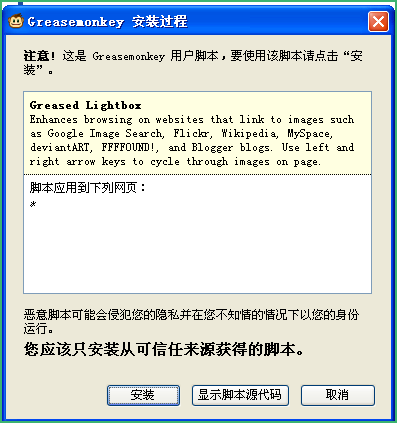
点击网页上任何以user.js结尾的URL都可以直接安装脚本,等待3秒,点击安装即可:
或者你手头上已经有user.js文件,直接拖曳到Firefox也可。
三、优秀Grease Monkey扩展
1、将Google Reader阅读分享到Twitter
Twitter最近越来越火,从饭否最近的动作你或许能看出一些端倪。
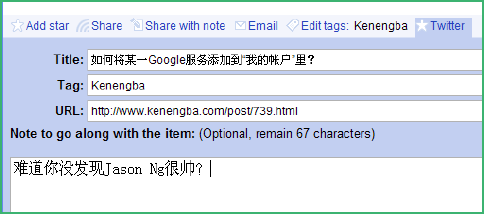
将你的阅读笔记分享到twitter会是个很不错的想法,然而使用twitterfox,hellotxt等第三方工具毕竟有些麻烦,因为你需要转移到其它工具,但是你正在GR里阅读。
Google Reader+Twitter这个脚本实现了在GR里直接分享文章到twitter的功能:
2、让Google搜索更即时
Twitter之所以被人认为可能会击败传统媒体一部分原因来自它的“即时性”。有时我们就是需要更为即时的结果,而Google提供的结果则相对比较迟缓。
将twitter search的结果加入到google search如何?
Twitter Search Results on Google 就是实现了这样的功能:
3、将http转换为https
使用https更为安全,地球人都知道,在中国上网,能用https的我建议都使用。
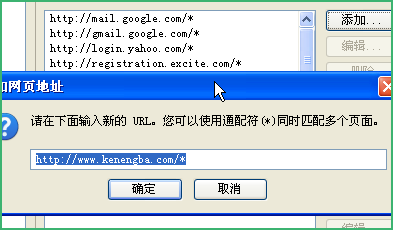
Http-to-Https redirector就是这样一个脚本,自动将适用范围的非http换成https:
这个脚本不是安装了就什么都不用做,你需要自己手动添加“应用范围”:
4、多Google用户登录
相信不少人拥有不止一个Google帐户,每次切换帐户都要登出原先的用户,这是十分麻烦的。
之前介绍的Gmail Manager可以实现多帐户切换,但我认为这个脚本更完美。
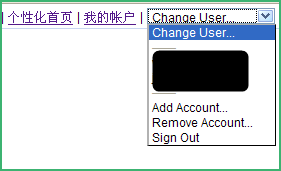
Google Account Multi-Login这个脚本会替换Google网页里的“登出”,替换为一个下拉菜单,选择不同的用户:
5、直接订阅RSS到Google Reader
点击某个博客上的“订阅到Google”按钮(你可以点击可能吧的按钮试试),会跳转到一个询问你是订阅到GR还是订阅到iGoogle,一般情况下我们都会订阅到GR。
Auto add to Google Reader替你轻松跳过这一步几乎无用的步骤。当然,如果你习惯用iGoogle来做订阅管理,那这个脚本不适合你。
6、自动保存文本域
有没有曾经遇到过很辛苦地打了一大串文字,然后浏览器崩溃了?所有事情都必须重来。
这是一个极其恐怖的体验。
Textarea Backup很好地解决了这个问题,每10s,每10个字,每当光标移出文本域,都会触发Textarea Backup保存一次文本域里的文字。一旦浏览器崩溃,下次打开这个网页,文本会被恢复。
更新:sfufoet推荐了更为好用的textarea backup with EXPIRY,主要的区别是,后者会在30分钟后撤销文本域的备份。
7、改变文本域的大小
Safari里可以直接拖曳文本输入区域的大小:
Textarea Resize脚本也可以实现类似的功能,但是不是拖曳改变大小,而是使用Ctrl+Enter或Ctrl+Space来使文本域增行。
8、直接获取Google图片搜索的图片
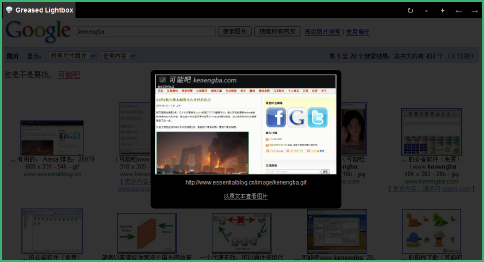
Greased Lightbox是我十分喜爱的一个脚本。它大大地改进Google图片搜索的体验。当点击某一个图片结果时,原图会直接以lightbox的形式前端展示:
同时还有上一张、下一张、放大、缩小的按钮。强烈推荐大家使用。


Sunday, February 08, 2009


Monday, November 12, 2007
10款最容易上瘾的Flash游戏

不同于单机游戏和网络游戏,Flash游戏大多为休闲型的小游戏。尽管如此,不少可玩性很高的Flash游戏还是会让我们津津有味的玩上一整天。这里有10款老外们选出来的最容易上瘾的Flash游戏,准备好沉迷吧。
01 - Bejeweled


04-Tower Defense


访问:10款最容易上瘾的Flash游戏
Monday, January 08, 2007
三百个好用的免费软件名单
办公
OpenOffice - office suite
PC Suite 602 - office suite
AbiWord - text editor
Atlantis Nova - text editor
Microsoft PowerPoint Viewer - power point files viewer
Adobe Reader - pdf reader
Foxit PDF Reader - pdf reader
PDFCreator - create pdf documents
Doc Convertor - document convertor
Convert - unit convertor
Converber - unit convertor
Sunbird - calendar/organizer
EssentialPIM Free - calendar/organizer
PhraseExpress - speed up your writing
ATnotes - create notes on the desktop
解压缩
7-Zip - compression program
IZArc - compression program
TugZIP - compression program
CabPack - compression program
Universal Extractor - extract files from any type of archive
互联网
Firefox - web browser
Internet Explorer- web browser
Maxthon - web browser
Opera - web browser
Avant Browser - web browser
Thunderbird - email client
PopTray - check for emails
Free Download Manager - download manager
FlashGet - download manager
WellGet - download manager
Download Master - download manager
WGET - commandline download manager
HTTrack - offline browser
WebReaper - offline browser
Yeah Reader - RSS reader
GreatNews - RSS reader
RSSOwl - RSS reader
P2P
µTorrent - torrent client
Azureus - torrent client
BitComet - torrent client
ABC - torrent client
BitTornado - torrent client
eMule - p2p client
SoulSeek - p2p client
Shareaza - p2p client
DC++ - Direct Connect network client
PeerGuardian - IP blocker
聊天
Miranda - chat client
MSN Messenger - chat client
Yahoo Messenger - chat client
QIP - chat client
Gaim - chat client
JAJC - chat client
HydraIRC - IRC client
Talkative IRC - IRC client
IceChat - IRC client
Skype - VOIP client
Google Talk - VOIP client
VoipStunt - VOIP client
Gizmo - VOIP client
Wengo - VOIP client
安全
AVG Free - antivirus
Avast Home Free - antivirus
AntiVir PersonalEdition - antivirus
BitDefender Free - antivirus
ClamWin - antivirus
CyberDifender - Internet Security Suite
Ad-aware - anti-spyware
Spybot: Search & Destroy - anti-spyware
Windows Defender - anti-spyware
SpywareBlaster - anti-spyware
Spyware Terminator - anti-spyware
Tootkit Reveaker - rootkit detection utility
Winpooch - system protection
HiJack Free - system protection
HighJackThis - hijackers detector and remover
Kerio Personal Firewall - firewall
Sygate Personal Firewall - firewall
ZoneAlarm - firewall
AxCrypt - file encryption
Simple File Shredder - securely delete files
PuTTy - SSH client
KeePass - password manager
LockNote - password manager
nPassword - password manager
Microsoft Baseline Security Analyzer - identify security misconfigurations
网络
Hamachi - VPN client
RealVNC - remote control
UltraVNC - remote control
Ethereal - local area network administration
The Dude - network administration
Wireshark - network administration
Angry IP Scanner - IP scanner
IP-Tools - IP scanner
Free Port Scanner - IP scanner
NetMeter - network bandwidth monitoring
服务器
FileZilla - FTP client
FileZilla Server - FTP server
EFTP - FTP client/server
XAMPP - integrated server package of Apache, mySQL, PHP and Perl
WAMP - Apache, PHP5 and MySQL server
音频
Foobar2000 - audio player
WinAmp - audio player
1by1 - audio player
JetAudio - audio player
XMPlay - audio player
Xion - audio player
Apollo - audio player
MediaMonkey - music organizer
The GodFather - music organizer
dBpowerAMP - audio converter
Audacity - audio converter
WavePad - audio converter
Kristal Audio Engine - audio editor
Exact Audio Copy - CD ripper
Audiograbber - CD ripper
CDex - CD ripper
Mp3 Tag Tools - tag editor
Mp3tag - tag editor
Taggin’ MP3 - tag editor
Monkey’s Audio - APE compressor/decompressor
mpTrim - mp3 editor
WavTrim - wave editor
EncSpot Basic - analyse mp3 files
视频
Windows Media Player - audio/video player
VLC - video player
Media Player Classic - video player
MV2Player - video player
CrystalPlayer 1.95 - video player
Zoom Player - video player
GOM Player - video player
viPlay - video player
DSPlayer - video player
VirtualDub - video editor
CamStudio - video screen recording
AviSplit - Avi splitter
Video mp3 Extractor - rip audio from video files
Free iPod Converter - convert all popular video formats to iPod video
MediaPortal - turning your PCinto a Media Center
The FilmMachine
图像
Gimp - image editor
PhotoFiltre - image editor
Paint.net - image editor
ArtRage - image editor
Artweaver - image editor
IrfanView - image viewer
Picasa - image viewer
XnView - image viewer
FastStone Image Viewer - image viewer
FuturixImager - image viewer
Easy Thumbnails - create thumbnails from images
JoJoThumb - create thumbnails from images
iWebAlbum - create web photo albums
JAlbum - create web photo albums
3D Box Shot Maker - design quality box shot
FastStone Capture - screen capture
WinSnap - screen capture
3D
Blender3D - 3D renderer
3Delight Free - 3D renderer
SketchUp - 3D modeling
Maya Learning Edition - 3D modeling
开发
AutoIt - task automation
SciTE4AutoIt3 - text editor for AutoIt
AutoHotkey - task automation
PHP Designer - PHP editor
Notepad++ - text editor
ConTEXT Editor - text editor
PSPad - text editor
FoxEditor - text editor
Crimson Editor - source code editor
Elfima Notepad - text editor
Notepad2 - text editor
Nvu - HTML editor
Alleycode - HTML editor
BlockNote - web page editor
Weaverslave - web page editor
CD/DVD
DeepBurner - CD/DVD burner
CDBurner XP Pro - CD/DVD burner
BurnAtOnce - CD/DVD burner
Express Burn - CD/DVD burner
Zilla CD-DVD Rip’n’Burn - CD/DVD
刻录
ImgBurn - ISO, BIN burner
Daemon tools - virtual CD/DVD
DVD Decrypter - DVD ripper
DVD Shrink - DVD ripper
Nero CD-DVD Speed - CD/DVD info and quality test
解码
GSpot - codec information
AC3Filter - audio codec
Xvid - video codec
QuickTime Alternative - video codec
Real Alternative - video codec
K-Lite Codec Pack - all codecs
系统工具
CCleaner - system cleaner
xp-AntiSpy - OS setup
jv16 Powertools - system utilities
XP SysPad - system monitoring utility
What’s Running - process guard
Registrar Lite - registry editor
WinIPConfig - replacement for “ipconfig.exe” and “route.exe”
Unlocker - file eraser
Eraser - secure file eraser
Undelete Plus - file recovery
freeCommander - file manager
ExplorerXP - file manager
Duplicate File Finder - find all duplicate files
Ant Renamer - file renaming
ReNamer - file renaming
Icons From File - icos extractor
Chaos MD5 - MD5 generator
HashTab - MD5, SHA1 and CRC-32 file hashes
Rainlendar Lite - desktop calendar
Weather Watcher - weather firecast
Subtitle Workshop - subtitles editor
Ant Movie Catalog - movie organizer
Disclib - CD organizer
Dexpot - virtual desktops
DriveImage XML - create partition images
MozBackup - backup and restore bookmarks, etc.
SyncBack - system backup
Atomic Cock Sync - syncronize your clock
Citrus Alarm Clock - alarm clock
TaskSwitchXP - Alt-Tab replacement
Launchy - application launcher
allSnap - make all windows snap
Sysinternals Tools - various system tools
StrokeIt - mouse gestures
Net Profiles - create profiles of your network settings
ResourceHacker - view, modify, rename, add, delete
Java Runtime Environment - java for Windows
UI设计
RocketDock - application launcher
AveDesk - desktop enhancer
IconPhile - customize windows’s system icons
CursorXP Free - change mouse cursors
MacSound - volume control
LClock - Windows Longhorn clock
Y’z Dock - application launcher
Y’z Shadow - shadow effect to the windows
Y’z Toolbar - change the toolbar icons in Explorer and Internet Explorer
Taskbar Shuffle - rearrange the programs on the taskbar by dragging
Visual Task Tips - thumbnail preview image for each task in the taskbar
Badges - put badges on any folder or file
Folderico - change icons of the folders
Folder Marker - mark your folders
Folder2MyPC - add favourite locations to My Computer
Microsoft TweakUI - system settings
BricoPacks - shell packs
ShellPacks - shell packs
Tango Shell Patcher - shell patcher
XPize - GUI enhancer
Vista Transformation Pack - complete visual style
Vista Sound Scheme - Windows Vista sound scheme
Royale Theme - visual style
硬件检测
CPU-Z - cpu information
CrystalCPUID - cpu information
Central Brain Identifier - cpu information
Everest - system information
SiSoft Sandra - system information
SpeedFan - hardware monitor
Memtest86 - memory test
PowerMax - HDD test
3Dmark 06 - 3D game performance benchmark
Aquamark - performance benchmark
rthdribl - 3D benchmark
Fraps - 3D benchmark, fps viewer and screen recorder
Prime 95 - cpu benchmarking
SuperPI - cpu benchmarking
CPU Rightmark - cpu overclock
Core Temp - cpu temperature
ATiTool - video overclock
ATI Tray Tools - Radeon tweaker
aTuner - GeForce and Radeontweaker
RivaTuner - video overclock
Nokia Monitor Test - monitor adjustmets
UDPixel - fix dead pixels
游戏
123 Free Solitaire - solitaire games collection
Arcade Pack - classic arcade games
Live For Speed - online racing simulator
Enigma - puzzle game
Freeciv - multiplayer strategy game
Tux Racer - race down steep, snow-covered mountains
教育
SpeQ Mathematics - mathematics program
Dia - diagram creation program
Google Earth - explore the world
NASA World Wind - 3D virtual globe
Celestia - explore the space
Stellarium - planetarium
杂类
nLite - Build your own custom Windows disk.
VirtualPC - create virtual machines
grabMotion - webcam capture
iDailyDiary - simple page-for-a-day diary
Pivot Stickfigure Animator - create stick-figure animations
Wink - create presentations
Scribus - professional page layout
FreeMind - midn mapping software
Windows Live Writer - WYSIWYG blog authoring
墙纸
Michael Swanson - 1920 x 1200; 1600 x 1200; amazing wallpapers
Mikhail Arkhipov - 1920 x 1200; 1600 x 1200; amazing wallpapers
powered by performancing firefox
前员工:再回首,腾讯对我挺好的
1:应届生薪水开的差不多7W/年,硕10W/年,即便差也差的不多,但招的人还是有一定要求,不是那么好混进去的.
2:腾讯的福利是互联网企业里算是很好的,只和网易,sina,sohu,TOM,盛大相比,和IBM,微软,华为比,个人感觉行业差距较大,没有可比性,另外个人也不了解.
3:应届生面试通过,在入职前的确会发50个连号的QQ号,那是用来赠送给班级的同学的,听HR的人说还是很受欢迎的,你想毕业后天隔一方,都用连号的QQ,在一个群里还是挺有意思的.
4:内部员工可以每月5折限量购买100个Q币,不过我都没买过,一般找业务线的同事要二十个充充会员什么的.
5:腾讯是没有住房公积金的,保险一般按最低交.季度,年终,双薪,项目奖金都有的.除非你所在部门很烂,项 目连续失败,每月工资收入能拿到税后5千,年入10万基本没有问题.
6:挖人很厉害,不管从营运到产品到研发,很多牛人都是用很高的价钱挖过来的.也推荐内部举荐形式,有专项伯乐奖金.大家都很乐意推荐朋友来面试,如通过,部门经理级10000,teamleader级5000,普通员工级500.
7:
公司管理还算很人性化,多少天病假不扣工资啊,内部活动也挺多的,上QQ当然可以,呵,,,不过你上MSN也没人会过问你基本不犯大错不会裁人.不过现在
人多了,有未位淘汰制了8:公司对外形象还是比较注意,出差普通员工住宿一级城市550,其他450,出租车全报,补助是另算(我的级别是80
块,不高).不过基本不用花钱,补助算是买烟钱了..吃饭睡觉都在酒店里搞定好了.有业务线同事常出差以前都是去机场买票,现在卡的紧些了,都要通过行政
从统一票务公司拿票了.
8:最后说一点,腾讯是一家互联网公司,研发能在公司受很重视,很大原因还是几个大老板都是技术出身,你去看看其
他互联网公司的研发人员就知道腾讯还算是比上不足,比下有余了.当然很多牛人有机会去IBM,去微软自有长远的发展,腾讯才8年历史,要走的路还很长.虽
然我已离职,还是希望她能一路走好,他的优秀的企业文化和公司氛围希望可以坚持.虽然现在发展过快,管理/执行都出现了一些问题,相信可以慢慢解决.
9:腾讯在深圳市内有几条班车线,有公司专用电梯,自己用大楼已经动工,据说08年投入使用.35层,据内部传说不出租,全部自用,个人表示怀疑能用的完么??
每
次看到很多网友说QQ这也要收费,那也要收费.但我只想说,腾讯是一家商业公司,他只能保证基本的功能免费,如果所有的业务全免费,腾讯也就倒了.也就没
有QQ了.MSN后面有微软,ICQ后面有AOL,QQ后面什么都没有,正是如此QQ才是全球范围能唯一能养活自己的IM通信厂商.
有人
说腾讯是一家没有技术含量的公司,中国的互联网应用技术中能在国际上叫的上号的,也只有IM这一项了.从软件质量,功能应用,我也有和MSN,
GTALK,YAHOO
MSG的即通人员有过行业交流,在他们眼里QQ仍是现在做的最为优秀的IM软件.记得一次我用一个刚带截屏功能的测试版给YAHOO
MSG一个瑞典哥们做QQ截屏演示的时候,他说:中国人太厉害了,太有想象力了.腾讯做即通研发的兄弟们是给我们中国人争了光这是没说的.
MSN和QQ对比也是比较多的,其实本质就是任何'一个厂商都不能把所有的市场份额站完,市场的细分就导致总有 各自的优势.离职的时候老大问了我一句话“念完书如果没有打算自己创业,还会回腾讯么?我回答是:你把位子让给我,我就回来,哈!!
腾讯在业内是一家很低调的公司,可能和几位老大的个性有关,大家也很难看到媒体上腾讯的宣传.其实上面一些内容都是有违公司规定的,即便我已离职.只是把原来好多想说的话一气说完而已.
powered by performancing firefox
Sunday, January 07, 2007
联想与微软正面冲突 称多媒体技术可替代XBOX
“我
们也有个盒子,但比XBOX便宜得多,完全可以替代这些高价游戏设备.”上周五,联想发布研发5年的多媒体协同技术,其高级工程师为此兴奋不已,大放豪
言.所谓多媒体协同技术,实际是一种PC的远程控制技术,通过它,电脑可以无线控制电视、手机、投影仪、摄像机等各种终端,比如将视频画面或者游戏画面
“分配”给电视屏幕.
“游戏运行在电脑上,但你却用电视机操纵游戏,同时你的家人还可以上网聊天,另一个人也许用手机看着电脑上播放
的电影.”联想的工程师用科幻故事一般的语言描述即将发生的现实,故事的场景和多年前微软的“维纳斯计划”殊途同归.事实上,3C(计算机、通信、家电)
融合的浪潮已将软硬件服务商的发展方向迅速拉近,而家庭娱乐被看作是更有潜力的市场.微软的XBOX360早已安排下相似功能,这个超级游戏机已不专属于
游戏迷,它可以实现联网游戏、音乐、电影、电视的下载,也能把电脑上的内容“运输”到电视上播出,其定位正是家庭娱乐中心.而联想的计划是让电脑而不是游
戏机处于在这个中心.
“个人电脑的名称或许因此改写,它会变成家庭服务器.”联想集团CTO贺志强说.但他也表示,联想的技术战略并非针
对某一厂商,“不可否认,现在太多公司都看准这个方向.”
惠普早已推出了专为家庭娱乐设计的机型和软件,网游公司盛大中途转型,也是为了承载娱乐内容的“盒子”.据了解,联想目前的做法是在电脑主机上加装软件,
终端上加装接收器“盒子”,从而实现对家电的无线控制,而这些“盒子”最终变成芯片植入家电设备中.据贺志强介绍,新技术的产品化还需等待12至18个
月,最后期限是在2008年夏天——奥运前夕.
powered by performancing firefox
微软Vista RTM CES展示现场多图抢鲜
| 微软Vista RTM CES展示现场多图抢鲜 | ||
| ||


powered by performancing firefox
powered by performancing firefox
书包行--U盘伴侣
书包行--U盘伴侣 V3.2.3 - 梦想软件园 [www.5icrack.com]
一款用浏览器形式实现的多功能、可无限扩充的个人信息助理软件。现集成有网页浏览、RSS阅读器、资料库、统一登录、日记本、音乐盒、联系人、记事本、联合搜索器等功能。实现了“网页浏览”与“个人信息管理”的自然融合。特别为移动存储设备(U盘等)量身定做,轻松拥有自己的移动书包。
1、通过一个书包文件集中存储和管理各种数据资料,方便备份与携带。
2、如果将书包文件放入U盘或其他可移动磁盘,就可制作自己的移动书包。
3、可设置访问密码,确保数据安全。
4、目前书包文件可集中存储收藏记录、历史记录、联系人、日记、帐号密码(通过点击即可直接登录网站或应用程序)、音乐播放列表、资料信息、RSS记录(内置RSS阅读器)。
5、通过程序集,采用网页浏览的方式来访问和操作书包文件中的数据,将“个人信息管理”与“网页浏览”整合起来,风格一致,操作简便。
6、书包行提供类似于ASP的程序集开发平台,可无限扩充书包文件可管理的数据种类及应用领域。附有详细的开发指南,提供大多数程序集的源代码。
特别提示:
1、RSS阅读器:多线程更新频道、OPML格式的导入与导出、支持记录的收藏与搜索。
2、统一登录:可以管理登录网站、应用程序的用户名、密码等信息。通过简单的点击,就可以直接登录MSN、QQ、邮箱、论坛、社区。
3、音乐盒:可连续播放Windows Media Player和RealPlayer支持的音乐文件,可连续播放“网上音乐”、“本地音乐”和“资料库中的音乐文件”。
4、程序中所有的记录列表,支持分页显示,点击表格标题栏可进行排序。
5、向资料库粘贴网页资料时,自动提取网页标题及相关链接地址。
powered by performancing firefox
powered by performancing firefox